

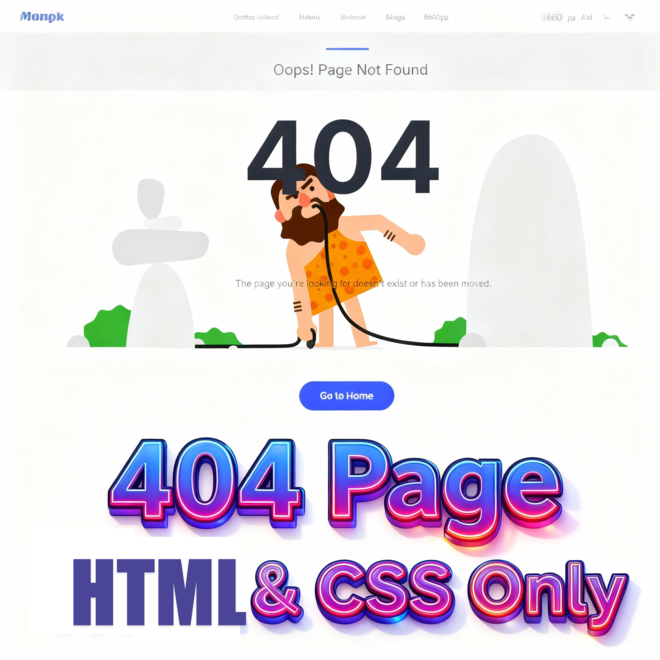
In this complete tutorial we will discover how to design a modern and professional “404” error page using HTML and CSS only. The provided source code features a clean UI responsive layout custom typography and smooth hover animations. You will learn how to incorporate engaging visuals like background GIFs a bold 404 headline and a clear call to action button to guide users back to the homepage. All designed to improve user experience and keep visitors engaged even when they land on a missing page.
Introduction
Welcome to this guide on how to create an awesome Custom 404 Page using HTML and CSS. Every website needs a 404 page – but most just have a bland, boring and uninspiring generic page. In this tutorial, we’re going to change that. You’re going to learn how to create a clean, modern and user friendly 404 page that not only tells visitors that something is wrong, but keeps them stimulated and encourages them to stay by looking through your site.
This project is great for beginners and web developers who want to make their sites look more professional without using JavaScript. You’re going to be looking at simple but powerful design techniques like flexbox, animated backgrounds and hover effects, which will all tie into making your page 100% responsive.
At the end of this project you’ll have yourself a very cool “Page Not Found” screen which looks like it was intentional, fits in with your identity and improves the overall user experience. Let’s turn that broken link into a beautiful design opportunity.
Why a Custom 404 Page Is Important
The page not found notion isn’t just a mere error page. It is your website’s chance at a second chance. People who land on a broken link or a mistyped URL can be redirected by an appropriately customized 404 page and not left encouraged to leave your site.
The proper 404 page provides for improved user experience, longer visits by the user on your site, and also improvement in your website’s search engine ranking by providing lessened bounces. It gives you a show of professionalism too, because you are not careless about even the details that go wrong.
In other words, a proper 404 page is a way of turning an aggravation incident into an incident of connecting with others, informing them of your websites’ services, and redirecting your users easily with style.
Project Setup
Before you begin to code, let’s set up your project for fast, easy, and efficiently scalable construction. A clean folder structure will guarantee that your 404 page loads smoothly and is easy to maintain going forward. Here’s an easy way to set it up:
1. Create a project folder: Include something catchy like custom-404-page in the name.
2. Inside the folder you create these files:
index.html – your main HTML page structures.
style.css – all of the custom styling.
Optional: assets/ – images, GIFs or other background media.
3. Link your CSS in index.html:
<link rel="stylesheet" href="style.css">Your setup will now allow you to begin coding the HTML structure and styling your 404 page for professional and user friendly fulfilment!
HTML Structure
To get started, we need to create a basic HTML file. This file will contain the main structure of our custom-404-page . Let’s go step by step and understand what the HTML code does:
Document Type and HTML Language
<!DOCTYPE html>
<html lang="en">- Defines a document type for HTML5.
- lang=”en” Which tells search engines and browsers that the page is in English. Good for accessibility and SEO.
Head Section
<head>
  <meta charset="UTF-8">
  <meta name="viewport" content="width=device-width, initial-scale=1.0">
  <title>404 Page Not Found</title>
  <link rel="stylesheet" href="style.css">
</head>
<meta charset="UTF-8">→ Which allows all characters including letters and emojis.<meta name="viewport"...>→ makes the page responsive etc. in the desktop version and on mobile devices.<title>→ appears in the tab in the browser. Important for SEO.<link rel="stylesheet" href="style.css">→ connects your CSS for styling.
Container
<div class="container">.containeris a wrapper that centers your content and gives padding around it.- Often used with Bootstrap grids to make the layout responsive.
Row
<div class="row">.rowis a flexbox/grid row inside the container.- Holds columns and ensures they align properly.
Column
<div class="col-sm-12 text-center">.col-sm-12→ Full-width column on small screens and up.text-center→ Centers text horizontally.- This column will hold your main 404 content.
404 Background Section
<div class="four_zero_four_bg">
  <h1>404</h1>
</div>.four_zero_four_bg→ Container for the “404” number with a background image or effect.<h1>→ Big, bold “404” text grabs attention instantly.
Content Box
<div class="contant_box_404">
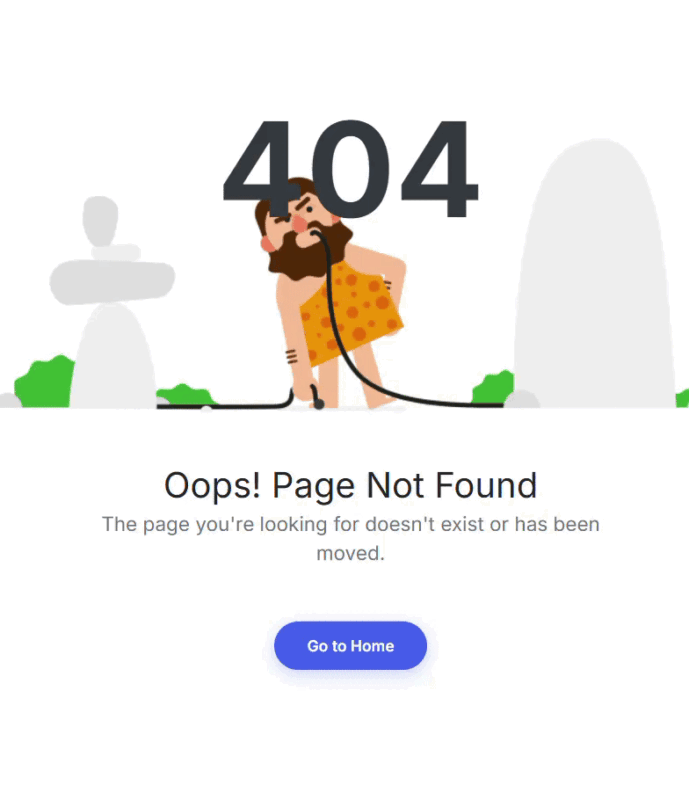
  <h3>Oops! Page Not Found</h3>
  <p>The page you’re looking for doesn’t exist or has been moved.</p>
  <a href="index.html" class="link_404">Go to Home</a>
</div>.contant_box_404→ Wraps all the message content.<h3>→ Shows a smaller heading for the error message.<p>→ Gives a friendly explanation to users.<a>→ Call-to-action button so users can return to the home page..link_404→ Styled button with colors, padding, hover effects.
Closing Divs
</div> <!-- col-sm-12 text-center -->
</div> <!-- row -->
</div> <!-- container -->- Closes all the open divs in reverse order.
- Maintains proper structure for layout and styling.
you can copy here the HTML full code.
<!DOCTYPE html>
<html lang="en">
  <head>
    <meta charset="UTF-8" />
    <title>404 page</title>
    <link
      rel="stylesheet"
      href="https://cdnjs.cloudflare.com/ajax/libs/twitter-bootstrap/3.3.7/css/bootstrap.min.css"
    />
    <link
      rel="stylesheet"
      href="https://fonts.googleapis.com/css2?family=Inter:wght@400;600;700&display=swap"
    />
    <link rel="stylesheet" href="style.css" />
  </head>
  <body>
    <section class="page_404">
      <div class="container">
        <div class="row">
          <div class="col-sm-12">
            <div class="col-sm-10 col-sm-offset-1 text-center">
              <div class="four_zero_four_bg">
                <h1 class="text-center">404</h1>
              </div>

              <div class="contant_box_404">
                <h3 class="h2">Oops! Page Not Found</h3>

             <p>
             he page you're looking for doesn't exist or has been moved.
                </p>

                <a href="" class="link_404">Go to Home</a>
              </div>
            </div>
          </div>
        </div>
      </div>
    </section>
  </body>
</html>

CSS Code
Once the basic HTML structure of the custom-404-page is ready, the next step is to style the card using CSS. Let’s go through the CSS code step by step:
Page Wrapper – .page_404
.page_404 {
  padding: 80px 0;
  background: #fff;
  font-family: 'Inter', sans-serif;
  min-height: 100vh;
  display: flex;
  align-items: center;
}
Explanation:
This section establishes the general stylistic consideration for the 404 page. It sets the padding on the top and bottom, a clean background of white, and uses a modern “Inter” typeface. The flex display positions the content for a perfect vertical alignment for every screen size.
Background Animation – .four_zero_four_bg
.four_zero_four_bg {
  background-image: url(https://cdn.dribbble.com/users/285475/screenshots/2083086/dribbble_1.gif);
  height: 300px;
  background-position: center;
  background-repeat: no-repeat;
  position: relative;
  margin-bottom: 30px;
}
Explanation:
Adds a fun, animated GIF background to accent the 404 error. The image is centered and does not repeat, giving the design a professional clean look. The margin adds spacing below the image.
Error Number Styling – .four_zero_four_bg h1
.four_zero_four_bg h1 {
  font-size: 120px;
  font-weight: 700;
  color: #343a40;
  text-align: center;
  margin: 0;
  line-height: 1;
}
Explanation:
Styles the oversized “404” number. The bold, dark color and gigantic font creates instant impact to alert the user that the page they are searching for is missing.
Content Box – .contant_box_404
.contant_box_404 {
  text-align: center;
  padding: 0 20px;
}
Explanation:
Centers all text and items vertically and horizontally in the 404 message area. The padding keeps all items nicely spaced within the box.
Subheading – .contant_box_404 h3
.contant_box_404 h3 {
  font-size: 32px;
  font-weight: 500;
  color: #212529;
  margin-bottom: 5px;
}
Explanation:
This creates the small headline style for messages such as “Oops! Page Not Found.” This has a somewhat larger font and medium weight to allow for readability and elegance.
Message Text – .contant_box_404 p
.contant_box_404 p {
  font-size: 18px;
  color: #6c757d;
  margin-bottom: 30px;
  max-width: 500px;
  margin-left: auto;
  margin-right: auto;
}
Explanation:
Creates a gentle, calming note to users. The neutral color and centered text keep it pleasant and professional. The max-width rule keeps it from growing too large.
Home Button – .link_404
.link_404 {
  color: #fff !important;
  padding: 12px 30px;
  background: #4361ee;
  margin: 20px 0;
  display: inline-block;
  text-decoration: none;
  border-radius: 50px;
  font-weight: 600;
  transition: all 0.3s ease;
  border: none;
  box-shadow: 0 4px 15px rgba(67, 97, 238, 0.3);
}
Explanation:
This styles the “Go to Home” button. The blue color, rounded edges and drop shadow make it leap visually at the viewer, encouraging clickthrough. The smooth transitions give hover effects a modern, premium look.
Button Hover Effect – .link_404:hover
.link_404:hover {
  background: #3a56d4;
  transform: translateY(-2px);
  box-shadow: 0 6px 20px rgba(67, 97, 238, 0.4);
}
Explanation:
When hovered, the button slightly seems to lift and darken — a simple animation that gives it a polished, interactive feel.
ext Alignment Helper – .text-center
.text-center {
  text-align: center;
  padding-top: 0px;
}
Explanation:
Used across the layout to center text elements. Keeps the design visually balanced and easy to read.
here you can copy the CSS full code
.page_404 {
        padding: 80px 0;
        background: #fff;
        font-family: 'Inter', sans-serif;
        min-height: 100vh;
        display: flex;
        align-items: center;
      }

      .four_zero_four_bg {
        background-image: url(https://cdn.dribbble.com/users/285475/screenshots/2083086/dribbble_1.gif);
        height: 300px;
        background-position: center;
        background-repeat: no-repeat;
        position: relative;
        margin-bottom: 30px;
      }

      .four_zero_four_bg h1 {
        font-size: 120px;
        font-weight: 700;
        color: #343a40;
        text-align: center;
        margin: 0;
        line-height: 1;
      }

      .contant_box_404 {
        text-align: center;
        padding: 0 20px;
      }

      .contant_box_404 h3 {
        font-size: 32px;
        font-weight: 500;
        color: #212529;
        margin-bottom: 5px;
      }

      .contant_box_404 p {
        font-size: 18px;
        color: #6c757d;
        margin-bottom: 30px;
        max-width: 500px;
        margin-left: auto;
        margin-right: auto;
      }

      .link_404 {
        color: #fff !important;
        padding: 12px 30px;
        background: #4361ee;
        margin: 20px 0;
        display: inline-block;
        text-decoration: none;
        border-radius: 50px;
        font-weight: 600;
        transition: all 0.3s ease;
        border: none;
        box-shadow: 0 4px 15px rgba(67, 97, 238, 0.3);
      }

      .link_404:hover {
        background: #3a56d4;
        transform: translateY(-2px);
        box-shadow: 0 6px 20px rgba(67, 97, 238, 0.4);
      }

      .text-center {
        text-align: center;
        padding-top: 0px;
      }
Output
Conclusion
You have built a new, contemporary 404 error page using HTML and CSS. When the visitor comes to the page that does not exist, the presentation is genial and professional. A foolish “Page not found” need not be boring! With some style it is more readable and will be of assistance in bringing the visitor back home. Keep creating. Keep improving. Every page counts; even the ragged one!
FAQs
What is a 404 page?
A 404 page is what users see when they visit a URL that doesn’t exist on your website. A 404 page guides them back to your site, rather than showing the dreaded blank error message.
Why should I have a custom 404 page?
A custom 404 page makes the user experience better, results in longer visits on your website, shows off your brand personality and can help your SEO.
Do I need JavaScript for this 404 page?
Nope! This is completely built with HTML and CSS, so it is lightweight, fast, loads on any device, etc.
Can I add animations or images to my 404 page?
Absolutely. You can use GIFs, SVGs, or animated backgrounds to make your 404 page fun, like in the example shown in this tutorial.
Is this 404 page designed for mobile?
Absolutely. With flexbox and with modern CSS, this is built to look gorgeous not only on phones but tablets and desktops as well.