

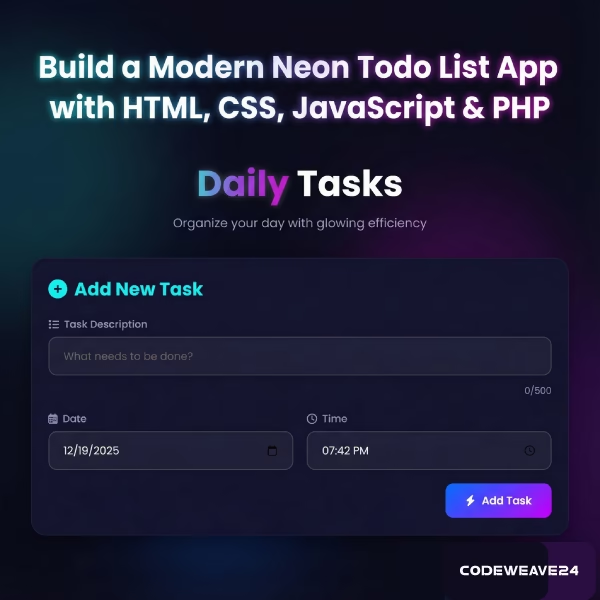
In this complete guide I will walk you through every step of building this application – from the glowing HTML structure to the smart JavaScript that powers it, all the way to the PHP backend that makes everything work. Whether you are a beginner looking to learn web development or an experienced developer seeking inspiration, there’s something here for you.
Introduction
Let me introduce you to something special – a Neon Glowing Todo List Application that turns the mundane task of organizing your day into something genuinely enjoyable. This is not just another boring checklist it’s a vibrant, animated and beautifully designed tool that makes productivity feel like a game.
The Problem It Solves
We all have things to do – work tasks, personal errands, life goals. But traditional todo lists often fail us because:
- They’re boring to look at (so we avoid them).
- They lack visual feedback (did I complete that task?).
- They don’t feel satisfying to use.
This app changes all that by combining functionality with stunning visuals it creates an experience where you actually want to check things off your list. It’s like turning productivity into a reward system for your brain.
Features Overview
Core Features:
- Add, Edit, Delete Tasks with descriptions, dates, and times.
- Toggle Task Status between pending and completed.
- Smart Sorting by date (ascending/descending) and status.
- Real-time Statistics showing pending/completed tasks.
- Character Counter for task descriptions.
- Overdue Task Detection with visual indicators.
- Responsive Design for all devices.
Visual Features:
- Neon Glow Effects with animated background.
- Gradient Color Scheme using CSS variables.
- Smooth Animations and transitions.
- Mobile-friendly Interface.
- Interactive Elements with hover effects.
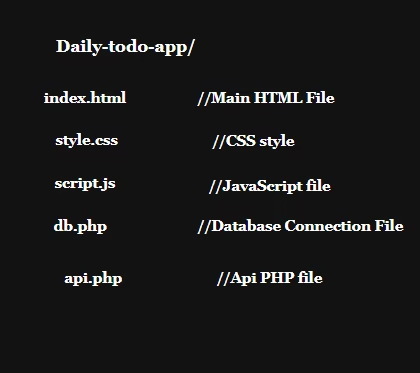
Project Structure
HTML Structure
This HTML file is the skeleton of our glowing todo list app it’s like building a house we are putting up the walls, doors and windows before we paint and decorate.
Here’s what each part does:
Head
- Character Set: Tells the browser to use proper text encoding.
- Mobile-Friendly Viewport: makes the page to be displayed on all screen sizes such as phones and computers.
- Page Title: Shows title in the browser tab.
- Font Awesome Icons: Loads all those cool icons.
- Google Font (Poppins): Uses a clean, modern font for all text.
- Our Stylesheet: Links to our custom CSS file for the neon glow effects.
- Favicon: That little swirly emoji(🌀) appears in the browser tab.
Background
- Floating Neon Circles: Four big glowing circles that float around in the background (creates that cool animated glow effect behind everything).
Main Container
- This is like the main room where everything happens.
Header Section
- Main Title: “Daily Tasks” with the word “Daily” in glowing neon text.
- Subtitle: A friendly description “Organize your day with glowing efficiency”.
Task Input Area
Title: “Add New Task” with a plus icon.
Task Description Box: Where you type what needs to be done:
- Character counter shows 0/500 (so you don’t write too much).
- Placeholder text: “What needs to be done?”
Date & Time Pickers:
- Calendar icon to choose a date.
- Clock icon to choose a time.
Add Task Button: Big glowing button with a lightning bolt icon.
Edit Task Popup
- Edit Form: Same as the add task form, but for editing existing tasks.
- Save & Cancel Buttons: To save changes or go back.
Footer
- Credit Line: Shows “Daily Tasks • Built with Codeweave24”.
- The word “Codeweave24” glows with neon pink.
Brain Connection
JavaScript File Link: This is what makes everything interactive – the “brain” of the operation.
<!DOCTYPE html>
<html lang="en">
<head>
<meta charset="UTF-8">
<meta name="viewport" content="width=device-width, initial-scale=1.0">
<title>Daily Tasks | Modern Task List</title>
<link rel="stylesheet" href="https://cdnjs.cloudflare.com/ajax/libs/font-awesome/6.4.0/css/all.min.css">
<link href="https://fonts.googleapis.com/css2?family=Poppins:wght@300;400;500;600;700&display=swap" rel="stylesheet">
<link rel="stylesheet" href="style.css">
<link rel="icon" type="image/x-icon"
href="data:image/svg+xml,<svg xmlns=%22http://www.w3.org/2000/svg%22 viewBox=%220 0 100 100%22><text y=%22.9em%22 font-size=%2290%22>🌀</text></svg>">
</head>
<body>
<!-- Neon Glow Background Elements -->
<div class="neon-bg">
<div class="neon-circle circle-1"></div>
<div class="neon-circle circle-2"></div>
<div class="neon-circle circle-3"></div>
<div class="neon-circle circle-4"></div>
</div>
<!-- Main Container -->
<div class="container">
<!-- Header -->
<header class="header">
<h1 class="neon-title">
<span class="neon-text">Daily</span> Tasks
</h1>
<p class="subtitle">Organize your day with glowing efficiency</p>
</header>
<!-- Task Input Form -->
<div class="input-card neon-card">
<h2><i class="fas fa-plus-circle"></i> Add New Task</h2>
<div class="input-group">
<div class="input-field">
<label for="task-text"><i class="fas fa-tasks"></i> Task Description</label>
<input type="text" id="task-text" placeholder="What needs to be done?" maxlength="500">
<div class="char-count"><span id="char-count">0</span>/500</div>
</div>
<div class="datetime-inputs">
<div class="input-field">
<label for="task-date"><i class="far fa-calendar-alt"></i> Date</label>
<input type="date" id="task-date">
</div>
<div class="input-field">
<label for="task-time"><i class="far fa-clock"></i> Time</label>
<input type="time" id="task-time">
</div>
</div>
<button id="add-task" class="neon-btn add-btn">
<i class="fas fa-bolt"></i> Add Task
</button>
</div>
</div>
<!-- Task Controls -->
<div class="controls">
<div class="sort-options">
<span class="control-label"><i class="fas fa-sort"></i> Sort by:</span>
<button class="sort-btn active" data-sort="date_asc">
<i class="fas fa-calendar-day"></i> Date (Asc)
</button>
<button class="sort-btn" data-sort="date_desc">
<i class="fas fa-calendar-week"></i> Date (Desc)
</button>
<button class="sort-btn" data-sort="status">
<i class="fas fa-check-circle"></i> Status
</button>
</div>
<div class="stats">
<span class="stat pending">
<i class="fas fa-clock"></i> <span id="pending-count">0</span> Pending
</span>
<span class="stat completed">
<i class="fas fa-check-circle"></i> <span id="completed-count">0</span> Completed
</span>
</div>
</div>
<!-- Task List -->
<div class="tasks-container">
<h2><i class="fas fa-list"></i> Your Tasks</h2>
<div id="tasks-list" class="tasks-list">
<!-- Tasks will be loaded here dynamically -->
<div class="loading">
<div class="neon-spinner"></div>
<p>Loading tasks...</p>
</div>
</div>
<div id="empty-state" class="empty-state">
<i class="fas fa-clipboard-list fa-3x"></i>
<h3>No tasks yet</h3>
<p>Add your first task to get started!</p>
</div>
</div>
<!-- Edit Task Modal -->
<div id="edit-modal" class="modal">
<div class="modal-content neon-card">
<div class="modal-header">
<h2><i class="fas fa-edit"></i> Edit Task</h2>
<button class="close-modal">×</button>
</div>
<div class="input-field">
<label for="edit-task-text">Task Description</label>
<input type="text" id="edit-task-text" maxlength="500">
<div class="char-count"><span id="edit-char-count">0</span>/500</div>
</div>
<div class="datetime-inputs">
<div class="input-field">
<label for="edit-task-date">Date</label>
<input type="date" id="edit-task-date">
</div>
<div class="input-field">
<label for="edit-task-time">Time</label>
<input type="time" id="edit-task-time">
</div>
</div>
<div class="modal-actions">
<button id="update-task" class="neon-btn save-btn">
<i class="fas fa-save"></i> Save Changes
</button>
<button id="cancel-edit" class="neon-btn cancel-btn">
<i class="fas fa-times"></i> Cancel
</button>
</div>
</div>
</div>
<!-- Footer -->
<footer class="footer">
<p>Daily Tasks • Built with <span class="neon-heart">Codeweave24</span></p>
</footer>
</div>
<!-- JavaScript -->
<script src="script.js"></script>
</body>
</html>CSS Styling
CSS is the makeup artist and interior designer for our to-do app. If HTML is the skeleton, CSS is what make HTML look stunning. Let me begin you through what each part does:
Main Container
- Max width: 1200px.
- Centered: Automatically centers itself.
- Padding: 20px space around edges.
- Z-index: 1 (sits above the background circles).
Cards
These are the raised panels that hold content:
- Background: Dark blue card color.
- Rounded Corners: 20px radius (soft, modern look).
- Shadow: Deep shadow for 3D effect.
- Border: Very subtle white border (5% opacity).
- Glass Effect: Slight blur behind the card (backdrop-filter).
- Hover Effect: Lifts up and gets a bigger shadow when you hover.
Input Fields
Styling for Input Boxes Padding:
- Comfortable 15px top/bottom, 20px sides.
- Background: Very dark (95% transparent black).
- Border: Subtle white border Rounded.
- Corners: 12px radius Focus.
- State: When you click inside:
- Border turns neon cyan.
- Gets a cyan glow.
- Background gets slightly lighter.
Date & Time Inputs
Grid Layout: Automatically adjusts based on screen size.
Minimum Width: 250px each (until they need to stack).
The Neon Button Base Style
- Padding: Generous 15px top/bottom, 30px sides.
- Rounded: 12px radius.
- Content: Flexbox to align icon and text.
- Position: Relative (for the hover effect).
- Hover Effect: Has a shiny “sweeping light” effect.
- A white gradient slides across when you hover.
- Created with a ::before pseudo-element.
Loading Spinner
- Circle with Border: 50px circle.
- Top Border Color: Neon cyan.
- Animation: Spins continuously.
Footer Glow
The word “Codeweave24” pulses with pink glow.
Uses the same glow animation as the title.
/* Reset and Base Styles */
* {
  margin: 0;
  padding: 0;
  box-sizing: border-box;
}

:root {
  /* Neon Color Palette */
  --neon-cyan: #0ff0fc;
  --neon-purple: #bf00ff;
  --neon-blue: #0066ff;
  --neon-pink: #ff00ff;
  --neon-green: #00ff9d;

  /* Dark Background Colors */
  --bg-dark: #0a0a1a;
  --bg-card: #12122e;
  --bg-darker: #050510;

  /* Text Colors */
  --text-light: #ffffff;
  --text-muted: #a0a0d0;

  /* Shadows and Glows */
  --shadow-neon-cyan: 0 0 10px var(--neon-cyan), 0 0 20px var(--neon-cyan), 0 0 30px var(--neon-cyan);
  --shadow-neon-purple: 0 0 10px var(--neon-purple), 0 0 20px var(--neon-purple), 0 0 30px var(--neon-purple);
  --shadow-neon-blue: 0 0 10px var(--neon-blue), 0 0 20px var(--neon-blue), 0 0 30px var(--neon-blue);
  --shadow-neon-pink: 0 0 10px var(--neon-pink), 0 0 20px var(--neon-pink), 0 0 30px var(--neon-pink);

  /* Transitions */
  --transition-fast: 0.2s ease;
  --transition-medium: 0.3s ease;
  --transition-slow: 0.5s ease;
}

body {
  font-family: 'Poppins', sans-serif;
  background-color: var(--bg-dark);
  color: var(--text-light);
  min-height: 100vh;
  overflow-x: hidden;
  position: relative;
}

/* Neon Background Elements */
.neon-bg {
  position: fixed;
  top: 0;
  left: 0;
  width: 100%;
  height: 100%;
  z-index: -1;
  overflow: hidden;
}

.neon-circle {
  position: absolute;
  border-radius: 50%;
  filter: blur(60px);
  opacity: 0.15;
  animation: float 20s infinite ease-in-out;
}

.circle-1 {
  width: 500px;
  height: 500px;
  background: var(--neon-cyan);
  top: -200px;
  left: -200px;
  animation-delay: 0s;
}

.circle-2 {
  width: 400px;
  height: 400px;
  background: var(--neon-purple);
  top: 50%;
  right: -150px;
  animation-delay: 5s;
}

.circle-3 {
  width: 300px;
  height: 300px;
  background: var(--neon-blue);
  bottom: -100px;
  left: 30%;
  animation-delay: 10s;
}

.circle-4 {
  width: 350px;
  height: 350px;
  background: var(--neon-pink);
  top: 20%;
  left: 60%;
  animation-delay: 15s;
}

/* Animations */
@keyframes float {

  0%,
  100% {
    transform: translateY(0) scale(1);
  }

  50% {
    transform: translateY(-20px) scale(1.05);
  }
}

@keyframes fadeIn {
  from {
    opacity: 0;
    transform: translateY(20px);
  }

  to {
    opacity: 1;
    transform: translateY(0);
  }
}

@keyframes pulse {
  0% {
    box-shadow: var(--shadow-neon-blue);
  }

  50% {
    box-shadow: 0 0 20px var(--neon-blue), 0 0 40px var(--neon-blue), 0 0 60px var(--neon-blue);
  }

  100% {
    box-shadow: var(--shadow-neon-blue);
  }
}

@keyframes glow {

  0%,
  100% {
    opacity: 1;
  }

  50% {
    opacity: 0.8;
  }
}

/* Container */
.container {
  max-width: 1200px;
  margin: 0 auto;
  padding: 20px;
  position: relative;
  z-index: 1;
}

/* Header */
.header {
  text-align: center;
  margin-bottom: 40px;
  padding-top: 20px;
  animation: fadeIn 1s ease-out;
}

.neon-title {
  font-size: 3.5rem;
  font-weight: 700;
  margin-bottom: 10px;
  letter-spacing: 1px;
}

.neon-text {
  background: linear-gradient(90deg, var(--neon-cyan), var(--neon-purple), var(--neon-pink));
  -webkit-background-clip: text;
  background-clip: text;
  color: transparent;
  text-shadow: 0 0 10px rgba(255, 255, 255, 0.3);
  animation: glow 2s infinite;
}

.subtitle {
  font-size: 1.2rem;
  color: var(--text-muted);
  font-weight: 300;
}

/* Cards */
.neon-card {
  background: var(--bg-card);
  border-radius: 20px;
  padding: 25px;
  box-shadow: 0 10px 30px rgba(0, 0, 0, 0.3);
  border: 1px solid rgba(255, 255, 255, 0.05);
  backdrop-filter: blur(10px);
  transition: var(--transition-medium);
}

.neon-card:hover {
  box-shadow: 0 15px 40px rgba(0, 0, 0, 0.4);
  transform: translateY(-5px);
}

/* Input Card */
.input-card {
  margin-bottom: 30px;
  animation: fadeIn 0.8s ease-out 0.2s both;
}

.input-card h2 {
  margin-bottom: 20px;
  color: var(--neon-cyan);
  font-size: 1.8rem;
  display: flex;
  align-items: center;
  gap: 10px;
}

.input-group {
  display: flex;
  flex-direction: column;
  gap: 20px;
}

.input-field {
  display: flex;
  flex-direction: column;
  gap: 8px;
}

.input-field label {
  color: var(--text-muted);
  font-weight: 500;
  font-size: 0.95rem;
  display: flex;
  align-items: center;
  gap: 8px;
}

.input-field input {
  padding: 15px 20px;
  background: rgba(255, 255, 255, 0.05);
  border: 2px solid rgba(255, 255, 255, 0.1);
  border-radius: 12px;
  color: var(--text-light);
  font-size: 1rem;
  font-family: 'Poppins', sans-serif;
  transition: var(--transition-fast);
}

.input-field input:focus {
  outline: none;
  border-color: var(--neon-cyan);
  box-shadow: 0 0 15px rgba(0, 255, 255, 0.3);
  background: rgba(255, 255, 255, 0.08);
}

.datetime-inputs {
  display: grid;
  grid-template-columns: repeat(auto-fit, minmax(250px, 1fr));
  gap: 20px;
}

.char-count {
  text-align: right;
  font-size: 0.85rem;
  color: var(--text-muted);
  margin-top: 5px;
}

/* Buttons */
.neon-btn {
  padding: 15px 30px;
  border: none;
  border-radius: 12px;
  font-family: 'Poppins', sans-serif;
  font-size: 1rem;
  font-weight: 600;
  cursor: pointer;
  transition: var(--transition-fast);
  display: flex;
  align-items: center;
  justify-content: center;
  gap: 10px;
  position: relative;
  overflow: hidden;
  z-index: 1;
}

.neon-btn::before {
  content: '';
  position: absolute;
  top: 0;
  left: 0;
  width: 100%;
  height: 100%;
  background: linear-gradient(90deg, transparent, rgba(255, 255, 255, 0.1), transparent);
  transform: translateX(-100%);
  transition: transform 0.6s ease;
  z-index: -1;
}

.neon-btn:hover::before {
  transform: translateX(100%);
}

.neon-btn:active {
  transform: scale(0.98);
}

.add-btn {
  background: linear-gradient(135deg, var(--neon-blue), var(--neon-purple));
  color: white;
  align-self: flex-end;
  max-width: 200px;
}

.add-btn:hover {
  transform: translateY(-3px);
}

.save-btn {
  background: linear-gradient(135deg, var(--neon-green), var(--neon-cyan));
  color: white;
}

.save-btn:hover {
  transform: translateY(-3px);
}

.cancel-btn {
  background: transparent;
  color: var(--text-muted);
  border: 2px solid rgba(255, 255, 255, 0.1);
}

.cancel-btn:hover {
  border-color: var(--neon-pink);
  color: var(--neon-pink);
  box-shadow: 0 0 10px rgba(255, 0, 255, 0.2);
}

/* Controls */
.controls {
  display: flex;
  justify-content: space-between;
  align-items: center;
  flex-wrap: wrap;
  gap: 20px;
  margin-bottom: 30px;
  padding: 20px 0;
  animation: fadeIn 0.8s ease-out 0.4s both;
}

.sort-options {
  display: flex;
  align-items: center;
  gap: 15px;
  flex-wrap: wrap;
}

.control-label {
  color: var(--text-muted);
  font-weight: 500;
  display: flex;
  align-items: center;
  gap: 8px;
}

.sort-btn {
  padding: 10px 20px;
  background: rgba(255, 255, 255, 0.05);
  border: 1px solid rgba(255, 255, 255, 0.1);
  border-radius: 8px;
  color: var(--text-muted);
  font-family: 'Poppins', sans-serif;
  font-size: 0.9rem;
  cursor: pointer;
  transition: var(--transition-fast);
  display: flex;
  align-items: center;
  gap: 8px;
}

.sort-btn:hover {
  background: rgba(255, 255, 255, 0.1);
  color: var(--text-light);
}

.sort-btn.active {
  background: linear-gradient(135deg, var(--neon-purple), var(--neon-pink));
  color: white;
  border-color: transparent;
  box-shadow: 0 0 10px rgba(191, 0, 255, 0.5);
}

.stats {
  display: flex;
  gap: 20px;
}

.stat {
  display: flex;
  align-items: center;
  gap: 8px;
  padding: 10px 20px;
  border-radius: 8px;
  font-weight: 500;
}

.stat.pending {
  background: rgba(255, 200, 0, 0.1);
  color: #ffcc00;
}

.stat.completed {
  background: rgba(0, 255, 157, 0.1);
  color: var(--neon-green);
}

/* Tasks Container */
.tasks-container {
  animation: fadeIn 0.8s ease-out 0.6s both;
}

.tasks-container h2 {
  margin-bottom: 20px;
  color: var(--text-light);
  font-size: 1.8rem;
  display: flex;
  align-items: center;
  gap: 10px;
}

.tasks-list {
  display: flex;
  flex-direction: column;
  gap: 15px;
  min-height: 200px;
}

/* Task Item */
.task-item {
  background: var(--bg-card);
  border-radius: 15px;
  padding: 20px;
  display: flex;
  align-items: center;
  justify-content: space-between;
  gap: 20px;
  border-left: 4px solid var(--neon-blue);
  transition: var(--transition-medium);
  animation: fadeIn 0.5s ease-out;
  position: relative;
  overflow: hidden;
}

.task-item::before {
  content: '';
  position: absolute;
  top: 0;
  left: 0;
  width: 4px;
  height: 100%;
  background: linear-gradient(to bottom, var(--neon-cyan), var(--neon-purple));
  opacity: 0;
  transition: opacity var(--transition-medium);
}

.task-item:hover {
  transform: translateX(5px);
  box-shadow: 0 10px 25px rgba(0, 0, 0, 0.3);
}

.task-item:hover::before {
  opacity: 1;
}

.task-item.completed {
  border-left-color: var(--neon-green);
  opacity: 0.8;
}

.task-item.completed .task-text {
  text-decoration: line-through;
  color: var(--text-muted);
}

.task-content {
  flex: 1;
  display: flex;
  flex-direction: column;
  gap: 8px;
}

.task-text {
  font-size: 1.1rem;
  color: var(--text-light);
  line-height: 1.5;
}

.task-meta {
  display: flex;
  gap: 15px;
  color: var(--text-muted);
  font-size: 0.9rem;
}

.task-date,
.task-time {
  display: flex;
  align-items: center;
  gap: 5px;
}

.task-status {
  padding: 5px 12px;
  border-radius: 20px;
  font-size: 0.8rem;
  font-weight: 600;
  letter-spacing: 0.5px;
}

.task-status.pending {
  background: rgba(255, 200, 0, 0.15);
  color: #ffcc00;
}

.task-status.completed {
  background: rgba(0, 255, 157, 0.15);
  color: var(--neon-green);
}

.task-actions {
  display: flex;
  gap: 10px;
}

.action-btn {
  width: 40px;
  height: 40px;
  border-radius: 50%;
  border: none;
  background: rgba(255, 255, 255, 0.05);
  color: var(--text-muted);
  cursor: pointer;
  display: flex;
  align-items: center;
  justify-content: center;
  transition: var(--transition-fast);
}

.action-btn:hover {
  background: rgba(255, 255, 255, 0.1);
  transform: scale(1.1);
}

.action-btn.complete:hover {
  color: var(--neon-green);
  box-shadow: 0 0 10px rgba(0, 255, 157, 0.3);
}

.action-btn.edit:hover {
  color: var(--neon-cyan);
  box-shadow: 0 0 10px rgba(0, 255, 255, 0.3);
}

.action-btn.delete:hover {
  color: var(--neon-pink);
  box-shadow: 0 0 10px rgba(255, 0, 255, 0.3);
}

/* Empty State */
.empty-state {
  text-align: center;
  padding: 60px 20px;
  color: var(--text-muted);
  display: none;
}

.empty-state i {
  margin-bottom: 20px;
  color: rgba(255, 255, 255, 0.1);
}

.empty-state h3 {
  font-size: 1.5rem;
  margin-bottom: 10px;
  color: var(--text-light);
}

/* Loading State */
.loading {
  text-align: center;
  padding: 60px 20px;
  color: var(--text-muted);
}

.neon-spinner {
  width: 50px;
  height: 50px;
  border: 3px solid rgba(255, 255, 255, 0.1);
  border-top-color: var(--neon-cyan);
  border-radius: 50%;
  margin: 0 auto 20px;
  animation: spin 1s linear infinite;
}

@keyframes spin {
  to {
    transform: rotate(360deg);
  }
}

/* Modal */
.modal {
  position: fixed;
  top: 0;
  left: 0;
  width: 100%;
  height: 100%;
  background: rgba(0, 0, 0, 0.8);
  backdrop-filter: blur(5px);
  display: none;
  align-items: center;
  justify-content: center;
  z-index: 1000;
  animation: fadeIn 0.3s ease-out;
}

.modal-content {
  width: 90%;
  max-width: 500px;
  animation: fadeIn 0.5s ease-out 0.1s both;
}

.modal-header {
  display: flex;
  justify-content: space-between;
  align-items: center;
  margin-bottom: 20px;
}

.modal-header h2 {
  color: var(--neon-cyan);
  font-size: 1.8rem;
  display: flex;
  align-items: center;
  gap: 10px;
}

.close-modal {
  background: none;
  border: none;
  color: var(--text-muted);
  font-size: 2rem;
  cursor: pointer;
  line-height: 1;
  transition: var(--transition-fast);
}

.close-modal:hover {
  color: var(--neon-pink);
}

.modal-actions {
  display: flex;
  gap: 15px;
  margin-top: 25px;
}

/* Footer */
.footer {
  text-align: center;
  margin-top: 50px;
  padding: 30px 0;
  color: var(--text-muted);
  font-size: 0.9rem;
  border-top: 1px solid rgba(255, 255, 255, 0.05);
}

.neon-heart {
  color: var(--neon-pink);
  text-shadow: 0 0 10px var(--neon-pink);
  animation: glow 1.5s infinite;
  outline: none;
}

.tech-stack {
  margin-top: 10px;
  font-size: 0.8rem;
  opacity: 0.7;
}

/* Responsive Design */
@media (max-width: 768px) {
  .container {
    padding: 15px;
  }

  .neon-title {
    font-size: 2.5rem;
  }

  .controls {
    flex-direction: column;
    align-items: flex-start;
  }

  .datetime-inputs {
    grid-template-columns: 1fr;
  }

  .task-item {
    flex-direction: column;
    align-items: flex-start;
    gap: 15px;
  }

  .task-actions {
    align-self: flex-end;
  }

  .modal-content {
    width: 95%;
    padding: 20px;
  }
}

@media (max-width: 480px) {
  .neon-title {
    font-size: 2rem;
  }

  .subtitle {
    font-size: 1rem;
  }

  .sort-options {
    flex-direction: column;
    align-items: flex-start;
  }

  .stats {
    flex-direction: column;
    gap: 10px;
  }

  .modal-actions {
    flex-direction: column;
  }

  .neon-btn {
    width: 100%;
  }
}
JavaScript Functionality
JavaScript is the conductor of our todo app orchestra. While HTML is the stage, CSS is the lighting/set design and JavaScript is what makes everything actually work and interact with you.
The Startup Sequence
- Grabs all the HTML elements.
- Sets smart defaults (today’s date, next hours time).
- Loads existing tasks from the server.
- Sets up all click listeners.
Adding a New Task
- Checks if everything is filled out.
- Shows loading animation on the button.
- Sends the tasks to the server.
- Clears the form and shows a success message.
- Reloads the tasks list with the new task.
Managing Tasks
- Complete/Incomplete: Click the checkmark to toggle status.
- Edit: Click the pencil to open the edit popup.
- Delete: Click the trash can.
document.addEventListener('DOMContentLoaded', function() {
// DOM Elements
const taskInput = document.getElementById('task-text');
const dateInput = document.getElementById('task-date');
const timeInput = document.getElementById('task-time');
const addButton = document.getElementById('add-task');
const tasksList = document.getElementById('tasks-list');
const emptyState = document.getElementById('empty-state');
const editModal = document.getElementById('edit-modal');
const editTaskText = document.getElementById('edit-task-text');
const editTaskDate = document.getElementById('edit-task-date');
const editTaskTime = document.getElementById('edit-task-time');
const updateButton = document.getElementById('update-task');
const cancelEditButton = document.getElementById('cancel-edit');
const closeModalButton = document.querySelector('.close-modal');
const sortButtons = document.querySelectorAll('.sort-btn');
const pendingCount = document.getElementById('pending-count');
const completedCount = document.getElementById('completed-count');
const charCount = document.getElementById('char-count');
const editCharCount = document.getElementById('edit-char-count');
// Application State
let currentSort = 'date_asc';
let editingTaskId = null;
let tasks = [];
// Set today's date as default
const today = new Date().toISOString().split('T')[0];
dateInput.value = today;
dateInput.min = today;
// Set default time to next hour
const nextHour = new Date();
nextHour.setHours(nextHour.getHours() + 1);
const timeString = nextHour.toTimeString().substring(0, 5);
timeInput.value = timeString;
// Initialize the application
init();
// Initialize the application
function init() {
loadTasks();
setupEventListeners();
}
// Set up all event listeners
function setupEventListeners() {
// Add task button
addButton.addEventListener('click', addTask);
// Enter key in task input
taskInput.addEventListener('keypress', function(e) {
if (e.key === 'Enter') {
addTask();
}
});
// Character count for task input
taskInput.addEventListener('input', function() {
charCount.textContent = this.value.length;
});
// Character count for edit task input
editTaskText.addEventListener('input', function() {
editCharCount.textContent = this.value.length;
});
// Sort buttons
sortButtons.forEach(button => {
button.addEventListener('click', function() {
const sort = this.dataset.sort;
setActiveSort(sort);
loadTasks();
});
});
// Modal buttons
updateButton.addEventListener('click', updateTask);
cancelEditButton.addEventListener('click', closeEditModal);
closeModalButton.addEventListener('click', closeEditModal);
// Close modal when clicking outside
editModal.addEventListener('click', function(e) {
if (e.target === editModal) {
closeEditModal();
}
});
// Escape key to close modal
document.addEventListener('keydown', function(e) {
if (e.key === 'Escape' && editModal.style.display === 'flex') {
closeEditModal();
}
});
}
// Load tasks from the server
async function loadTasks() {
try {
showLoading();
const response = await fetch(`api.php?sort=${currentSort}`);
const result = await response.json();
if (result.success) {
tasks = result.data;
renderTasks();
updateStats();
// Show/hide empty state
if (tasks.length === 0) {
emptyState.style.display = 'block';
tasksList.style.display = 'none';
} else {
emptyState.style.display = 'none';
tasksList.style.display = 'flex';
}
} else {
showNotification('Error loading tasks', 'error');
}
} catch (error) {
console.error('Error:', error);
showNotification('Network error. Please try again.', 'error');
}
}
// Render tasks to the DOM
function renderTasks() {
tasksList.innerHTML = '';
tasks.forEach(task => {
const taskElement = createTaskElement(task);
tasksList.appendChild(taskElement);
});
}
// Create a task element
function createTaskElement(task) {
const taskElement = document.createElement('div');
taskElement.className = `task-item ${task.status}`;
taskElement.dataset.id = task.id;
// Format date for display
const dueDate = new Date(`${task.task_date} ${task.task_time}`);
const now = new Date();
const isOverdue = dueDate < now && task.status === 'pending';
if (isOverdue) {
taskElement.classList.add('overdue');
}
taskElement.innerHTML = `
<div class="task-content">
<div class="task-text">${escapeHtml(task.task_text)}</div>
<div class="task-meta">
<span class="task-date">
<i class="far fa-calendar-alt"></i>
${task.formatted_date}
</span>
<span class="task-time">
<i class="far fa-clock"></i>
${task.formatted_time}
</span>
<span class="task-status ${task.status}">
${task.status === 'pending' ? 'Pending' : 'Completed'}
${isOverdue ? ' (Overdue)' : ''}
</span>
</div>
</div>
<div class="task-actions">
<button class="action-btn complete" title="Mark as ${task.status === 'pending' ? 'completed' : 'pending'}">
<i class="fas fa-${task.status === 'pending' ? 'check-circle' : 'undo'}"></i>
</button>
<button class="action-btn edit" title="Edit task">
<i class="fas fa-edit"></i>
</button>
<button class="action-btn delete" title="Delete task">
<i class="fas fa-trash-alt"></i>
</button>
</div>
`;
// Add event listeners to action buttons
const completeBtn = taskElement.querySelector('.complete');
const editBtn = taskElement.querySelector('.edit');
const deleteBtn = taskElement.querySelector('.delete');
completeBtn.addEventListener('click', () => toggleTaskStatus(task.id, task.status));
editBtn.addEventListener('click', () => openEditModal(task));
deleteBtn.addEventListener('click', () => deleteTask(task.id));
return taskElement;
}
// Add a new task
async function addTask() {
const taskText = taskInput.value.trim();
const taskDate = dateInput.value;
const taskTime = timeInput.value;
// Validation
if (!taskText) {
showNotification('Please enter a task description', 'warning');
taskInput.focus();
return;
}
if (!taskDate) {
showNotification('Please select a date', 'warning');
dateInput.focus();
return;
}
if (!taskTime) {
showNotification('Please select a time', 'warning');
timeInput.focus();
return;
}
try {
addButton.disabled = true;
addButton.innerHTML = '<i class="fas fa-spinner fa-spin"></i> Adding...';
const response = await fetch('api.php', {
method: 'POST',
headers: {
'Content-Type': 'application/json',
},
body: JSON.stringify({
task_text: taskText,
task_date: taskDate,
task_time: taskTime
})
});
const result = await response.json();
if (result.success) {
// Clear inputs
taskInput.value = '';
dateInput.value = today;
timeInput.value = timeString;
charCount.textContent = '0';
// Show success message
showNotification('Task added successfully', 'success');
// Reload tasks
loadTasks();
// Scroll to tasks
document.querySelector('.tasks-container').scrollIntoView({
behavior: 'smooth'
});
} else {
showNotification(result.message || 'Failed to add task', 'error');
}
} catch (error) {
console.error('Error:', error);
showNotification('Network error. Please try again.', 'error');
} finally {
addButton.disabled = false;
addButton.innerHTML = '<i class="fas fa-bolt"></i> Add Task';
}
}
// Toggle task status between pending and completed
async function toggleTaskStatus(taskId, currentStatus) {
const newStatus = currentStatus === 'pending' ? 'completed' : 'pending';
try {
const response = await fetch(`api.php?id=${taskId}`, {
method: 'PUT',
headers: {
'Content-Type': 'application/json',
},
body: JSON.stringify({
status: newStatus
})
});
const result = await response.json();
if (result.success) {
showNotification(`Task marked as ${newStatus}`, 'success');
loadTasks();
} else {
showNotification(result.message || 'Failed to update task', 'error');
}
} catch (error) {
console.error('Error:', error);
showNotification('Network error. Please try again.', 'error');
}
}
//Open edit modal with task data
function openEditModal(task) {
editingTaskId = task.id;
editTaskText.value = task.task_text;
editTaskDate.value = task.task_date;
editTaskTime.value = task.task_time;
editCharCount.textContent = task.task_text.length;
editModal.style.display = 'flex';
editTaskText.focus();
}
//Close edit modal
function closeEditModal() {
editModal.style.display = 'none';
editingTaskId = null;
editTaskText.value = '';
editTaskDate.value = '';
editTaskTime.value = '';
}
// Update task with edited data
async function updateTask() {
const taskText = editTaskText.value.trim();
const taskDate = editTaskDate.value;
const taskTime = editTaskTime.value;
// Validation
if (!taskText) {
showNotification('Please enter a task description', 'warning');
editTaskText.focus();
return;
}
if (!taskDate) {
showNotification('Please select a date', 'warning');
editTaskDate.focus();
return;
}
if (!taskTime) {
showNotification('Please select a time', 'warning');
editTaskTime.focus();
return;
}
try {
updateButton.disabled = true;
updateButton.innerHTML = '<i class="fas fa-spinner fa-spin"></i> Saving...';
const response = await fetch(`api.php?id=${editingTaskId}`, {
method: 'PUT',
headers: {
'Content-Type': 'application/json',
},
body: JSON.stringify({
task_text: taskText,
task_date: taskDate,
task_time: taskTime
})
});
const result = await response.json();
if (result.success) {
showNotification('Task updated successfully', 'success');
closeEditModal();
loadTasks();
} else {
showNotification(result.message || 'Failed to update task', 'error');
}
} catch (error) {
console.error('Error:', error);
showNotification('Network error. Please try again.', 'error');
} finally {
updateButton.disabled = false;
updateButton.innerHTML = '<i class="fas fa-save"></i> Save Changes';
}
}
// Delete a task
async function deleteTask(taskId) {
if (!confirm('Are you sure you want to delete this task?')) {
return;
}
try {
const taskElement = document.querySelector(`.task-item[data-id="${taskId}"]`);
const deleteBtn = taskElement.querySelector('.delete');
deleteBtn.disabled = true;
deleteBtn.innerHTML = '<i class="fas fa-spinner fa-spin"></i>';
const response = await fetch(`api.php?id=${taskId}`, {
method: 'DELETE'
});
const result = await response.json();
if (result.success) {
showNotification('Task deleted successfully', 'success');
loadTasks();
} else {
showNotification(result.message || 'Failed to delete task', 'error');
deleteBtn.disabled = false;
deleteBtn.innerHTML = '<i class="fas fa-trash-alt"></i>';
}
} catch (error) {
console.error('Error:', error);
showNotification('Network error. Please try again.', 'error');
}
}
// Set active sort and update UI
function setActiveSort(sort) {
currentSort = sort;
sortButtons.forEach(button => {
if (button.dataset.sort === sort) {
button.classList.add('active');
} else {
button.classList.remove('active');
}
});
}
// Update statistics counters
function updateStats() {
const pending = tasks.filter(task => task.status === 'pending').length;
const completed = tasks.filter(task => task.status === 'completed').length;
pendingCount.textContent = pending;
completedCount.textContent = completed;
}
// Show loading state
function showLoading() {
tasksList.innerHTML = `
<div class="loading">
<div class="neon-spinner"></div>
<p>Loading tasks...</p>
</div>
`;
tasksList.style.display = 'flex';
emptyState.style.display = 'none';
}
// Show notification message
function showNotification(message, type = 'info') {
// Remove existing notification
const existingNotification = document.querySelector('.notification');
if (existingNotification) {
existingNotification.remove();
}
// Create notification element
const notification = document.createElement('div');
notification.className = `notification ${type}`;
notification.innerHTML = `
<div class="notification-content">
<i class="fas fa-${type === 'success' ? 'check-circle' : type === 'error' ? 'exclamation-circle' : type === 'warning' ? 'exclamation-triangle' : 'info-circle'}"></i>
<span>${message}</span>
</div>
<button class="notification-close">
<i class="fas fa-times"></i>
</button>
`;
// Add to DOM
document.body.appendChild(notification);
// Add styles
notification.style.cssText = `
position: fixed;
top: 20px;
right: 20px;
padding: 15px 20px;
background: ${type === 'success' ? 'rgba(0, 255, 157, 0.15)' :
type === 'error' ? 'rgba(255, 0, 100, 0.15)' :
type === 'warning' ? 'rgba(255, 200, 0, 0.15)' :
'rgba(0, 255, 255, 0.15)'};
border-left: 4px solid ${type === 'success' ? 'var(--neon-green)' :
type === 'error' ? '#ff0064' :
type === 'warning' ? '#ffcc00' :
'var(--neon-cyan)'};
border-radius: 8px;
color: white;
display: flex;
align-items: center;
justify-content: space-between;
gap: 15px;
max-width: 400px;
z-index: 1001;
backdrop-filter: blur(10px);
animation: fadeIn 0.3s ease-out, fadeOut 0.3s ease-out 3s forwards;
`;
// Add close button functionality
const closeBtn = notification.querySelector('.notification-close');
closeBtn.addEventListener('click', () => {
notification.style.animation = 'fadeOut 0.3s ease-out forwards';
setTimeout(() => notification.remove(), 300);
});
// Auto-remove after 3 seconds
setTimeout(() => {
if (notification.parentNode) {
notification.style.animation = 'fadeOut 0.3s ease-out forwards';
setTimeout(() => notification.remove(), 300);
}
}, 3000);
}
function escapeHtml(text) {
const div = document.createElement('div');
div.textContent = text;
return div.innerHTML;
}
// Add CSS for fadeOut animation if not exists
if (!document.querySelector('#notification-styles')) {
const style = document.createElement('style');
style.id = 'notification-styles';
style.textContent = `
@keyframes fadeOut {
from { opacity: 1; transform: translateX(0); }
to { opacity: 0; transform: translateX(20px); }
}
.notification-close {
background: none;
border: none;
color: rgba(255, 255, 255, 0.7);
cursor: pointer;
font-size: 1rem;
transition: color 0.2s ease;
}
.notification-close:hover {
color: white;
}
.notification-content {
display: flex;
align-items: center;
gap: 10px;
}
.task-item.overdue .task-status.pending {
color: #ff5555;
background: rgba(255, 85, 85, 0.15);
}
`;
document.head.appendChild(style);
}
});Database Connection
PHP file is the security guard and messenger for your app’s data storage.
What It Does Simply:
- Creates a secure tunnel between your app and the database.
- Handles credentials safely (username, password, database name).
- Manages communication using PDO (PHP’s secure database system).
- Catches errors gracefully so the app isn’t crash.
- Sets up proper text encoding for emojis and special characters.
The Setup:
- Address: localhost (your own computer/server).
- Storage Room: todo_app database.
- Security Code: root username (empty password for local testing).
- Communication Method: PDO (Professional Data Objects – safe & modern).
Safety Features:
- Error Mode: Exception mode (catches mistakes properly).
- UTF-8 Encoding: Supports all languages and emojis.
- JSON Response: Returns clean error messages if connection fails.
- Error Logging: Writes connection problems to server logs.
<?php
// Database Connection File

class Database {
    private $host = 'localhost';
    private $db_name = 'todo_app';
    private $username = 'root';
    private $password = '';
    private $conn;

    public function connect() {
        $this->conn = null;

        try {
            $this->conn = new PDO(
                "mysql:host=" . $this->host . ";dbname=" . $this->db_name,
                $this->username,
                $this->password,
                array(PDO::ATTR_ERRMODE => PDO::ERRMODE_EXCEPTION)
            );

            $this->conn->exec("set names utf8mb4");

        } catch(PDOException $exception) {
            error_log("Connection error: " . $exception->getMessage());

            header('Content-Type: application/json');
            echo json_encode([
                'success' => false,
                'message' => 'Database connection failed'
            ]);
            exit();
        }

        return $this->conn;
    }
}
?>
PHP Backend API
API is the receptionist and manager of your todo app – it handles all incoming requests and decides what to do with them.
The Four Main Jobs:
1. GET – The Information Desk
- “Show me all tasks” – Lists everything with sorting options.
- “Show me task #5” – Finds one specific task.
- Returns nicely formatted dates and times.
2. POST – The Registration Desk
- “I have a new task to add” – Creates new tasks.
- Checks for missing info before accepting.
- Confirms with an ID number when successful.
3. PUT – The Update Desk
- “I need to change task #5” – Updates existing tasks.
- Smart updating – only changes what you send.
- Can update text, date, time, or status.
4. DELETE – The Removal Desk
- “Please delete task #5” – Removes tasks permanently.
- Requires task ID for safety.
- Confirms deletion when done.
<?php
//API for To-Do List Application

header('Content-Type: application/json');
header('Access-Control-Allow-Origin: *');
header('Access-Control-Allow-Methods: GET, POST, PUT, DELETE, OPTIONS');
header('Access-Control-Allow-Headers: Content-Type');

if ($_SERVER['REQUEST_METHOD'] === 'OPTIONS') {
    http_response_code(200);
    exit();
}

require_once 'db.php';

// Initialize database
$database = new Database();
$db = $database->connect();

// Get request method
$method = $_SERVER['REQUEST_METHOD'];

// Get task ID
$task_id = isset($_GET['id']) ? intval($_GET['id']) : 0;

// Main API routing
try {
    switch ($method) {
        case 'GET':
            if ($task_id > 0) {
                $query = "SELECT * FROM tasks WHERE id = :id";
                $stmt = $db->prepare($query);
                $stmt->bindParam(':id', $task_id);
                $stmt->execute();

                if ($stmt->rowCount() > 0) {
                    $task = $stmt->fetch(PDO::FETCH_ASSOC);
                    echo json_encode(['success' => true, 'data' => $task]);
                } else {
                    echo json_encode(['success' => false, 'message' => 'Task not found']);
                }
            } else {
                $sort = isset($_GET['sort']) ? $_GET['sort'] : 'date_asc';

                switch ($sort) {
                    case 'date_desc':
                        $order_by = "task_date DESC, task_time DESC";
                        break;
                    case 'status':
                        $order_by = "status ASC, task_date ASC, task_time ASC";
                        break;
                    default:
                        $order_by = "task_date ASC, task_time ASC";
                }

                $query = "SELECT * FROM tasks ORDER BY $order_by";
                $stmt = $db->prepare($query);
                $stmt->execute();

                $tasks = $stmt->fetchAll(PDO::FETCH_ASSOC);

                foreach ($tasks as &$task) {
                    $task['formatted_date'] = date('M d, Y', strtotime($task['task_date']));
                    $task['formatted_time'] = date('g:i A', strtotime($task['task_time']));
                }

                echo json_encode(['success' => true, 'data' => $tasks]);
            }
            break;

        case 'POST':
            $data = json_decode(file_get_contents("php://input"), true);

            if (!isset($data['task_text']) || !isset($data['task_date']) || !isset($data['task_time'])) {
                echo json_encode(['success' => false, 'message' => 'Missing required fields']);
                break;
            }

            $query = "INSERT INTO tasks (task_text, task_date, task_time)
                     VALUES (:task_text, :task_date, :task_time)";

            $stmt = $db->prepare($query);
            $stmt->bindParam(':task_text', $data['task_text']);
            $stmt->bindParam(':task_date', $data['task_date']);
            $stmt->bindParam(':task_time', $data['task_time']);

            if ($stmt->execute()) {
                $last_id = $db->lastInsertId();
                echo json_encode([
                    'success' => true,
                    'message' => 'Task added successfully',
                    'id' => $last_id
                ]);
            } else {
                echo json_encode(['success' => false, 'message' => 'Failed to add task']);
            }
            break;

        case 'PUT':
            $data = json_decode(file_get_contents("php://input"), true);

            if ($task_id === 0) {
                echo json_encode(['success' => false, 'message' => 'Task ID required']);
                break;
            }

            $update_fields = [];
            $params = [':id' => $task_id];

            if (isset($data['task_text'])) {
                $update_fields[] = "task_text = :task_text";
                $params[':task_text'] = $data['task_text'];
            }

            if (isset($data['task_date'])) {
                $update_fields[] = "task_date = :task_date";
                $params[':task_date'] = $data['task_date'];
            }

            if (isset($data['task_time'])) {
                $update_fields[] = "task_time = :task_time";
                $params[':task_time'] = $data['task_time'];
            }

            if (isset($data['status'])) {
                $update_fields[] = "status = :status";
                $params[':status'] = $data['status'];
            }

            if (empty($update_fields)) {
                echo json_encode(['success' => false, 'message' => 'No fields to update']);
                break;
            }

            $query = "UPDATE tasks SET " . implode(', ', $update_fields) . " WHERE id = :id";
            $stmt = $db->prepare($query);

            foreach ($params as $key => $value) {
                $stmt->bindValue($key, $value);
            }

            if ($stmt->execute()) {
                echo json_encode(['success' => true, 'message' => 'Task updated successfully']);
            } else {
                echo json_encode(['success' => false, 'message' => 'Failed to update task']);
            }
            break;

        case 'DELETE':
            if ($task_id === 0) {
                echo json_encode(['success' => false, 'message' => 'Task ID required']);
                break;
            }

            $query = "DELETE FROM tasks WHERE id = :id";
            $stmt = $db->prepare($query);
            $stmt->bindParam(':id', $task_id);

            if ($stmt->execute()) {
                echo json_encode(['success' => true, 'message' => 'Task deleted successfully']);
            } else {
                echo json_encode(['success' => false, 'message' => 'Failed to delete task']);
            }
            break;

        default:
            echo json_encode(['success' => false, 'message' => 'Invalid request method']);
            break;
    }

} catch (PDOException $e) {
    error_log("API Error: " . $e->getMessage());
    echo json_encode(['success' => false, 'message' => 'Server error occurred']);
}
?>
Future Enhancements
1.User Accounts:
- Registration/login system.
- Personalized task lists.
- User preferences.
2.Advanced Features:
- Task categories/tags.
- Task prioritization.
- File attachments.
3.UI/UX:
- Dark/light mode toggle.
- Custom color themes.
- Drag and drop reordering.
- Offline functionality.
4.Integration Capabilities:
- Calendar integration.
- Email reminders.
- Export/import tasks.
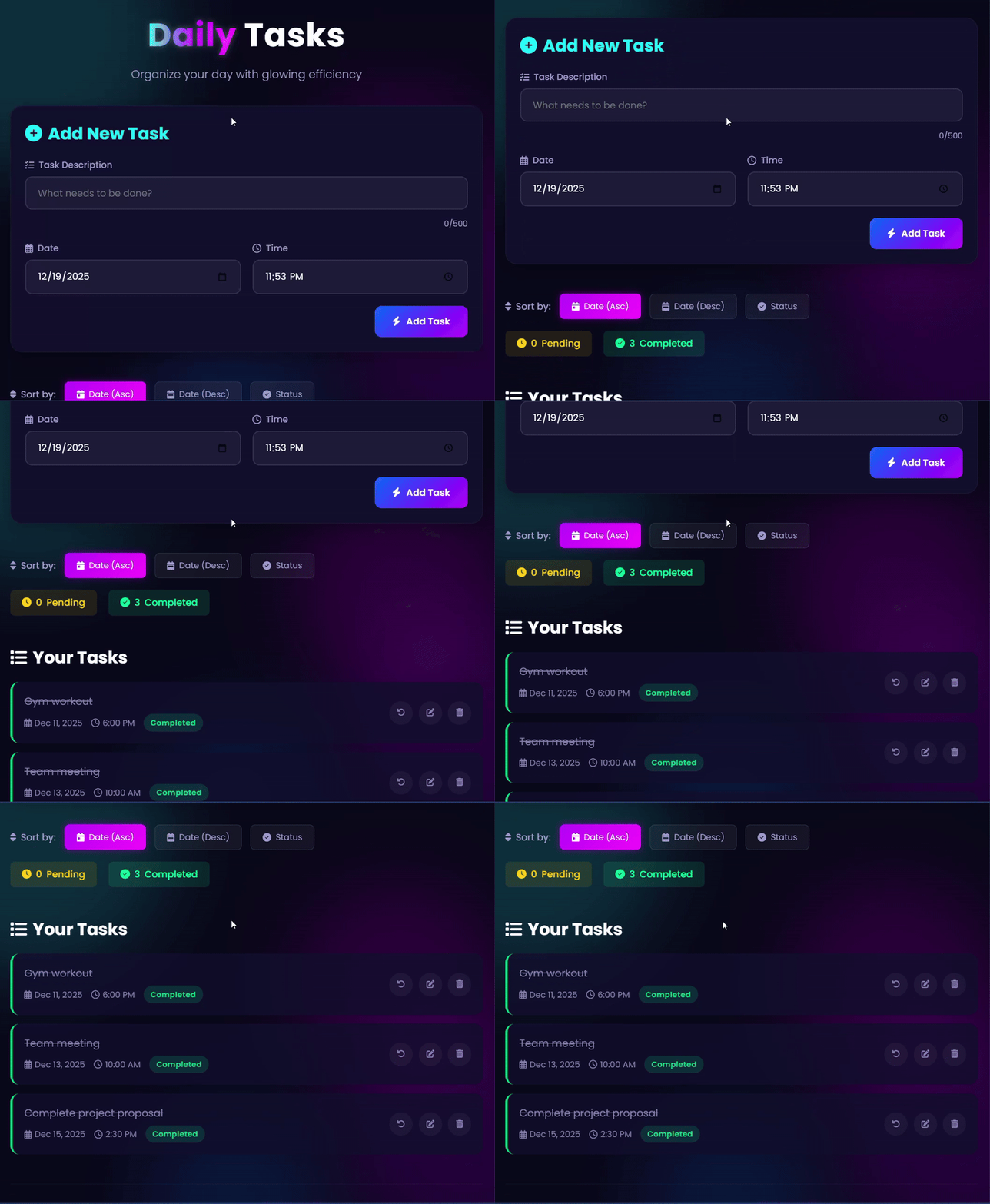
Output
Conclusion
This Neon Todo List Application demonstrates modern web development practices combining: Beautiful
- UI/UX with neon aesthetics.
- Full CRUD Functionality for task management.
- Responsive Design for all devices.
- Secure Backend API with PHP/MySQL.
- Performance Optimized codebase.
The project serves an excellent foundation for learning full-stack development with clear separation of concerns between frontend and backend components. It’s production-ready with proper security measures while remaining accessible for beginners to understand and modify.