


Samsung AI glasses bring a tempting idea closer: ask about the world in front of you without reaching for your phone. But before you picture a floating screen inside the lenses, there is one detail worth knowing: this eyewear answers through audio, not a display.
That makes the buying question more interesting. Would you pay for fewer moments spent pulling out your phone, or would another connected device simply become another thing to charge? Here are seven essential facts, followed by a practical checklist to help you decide.
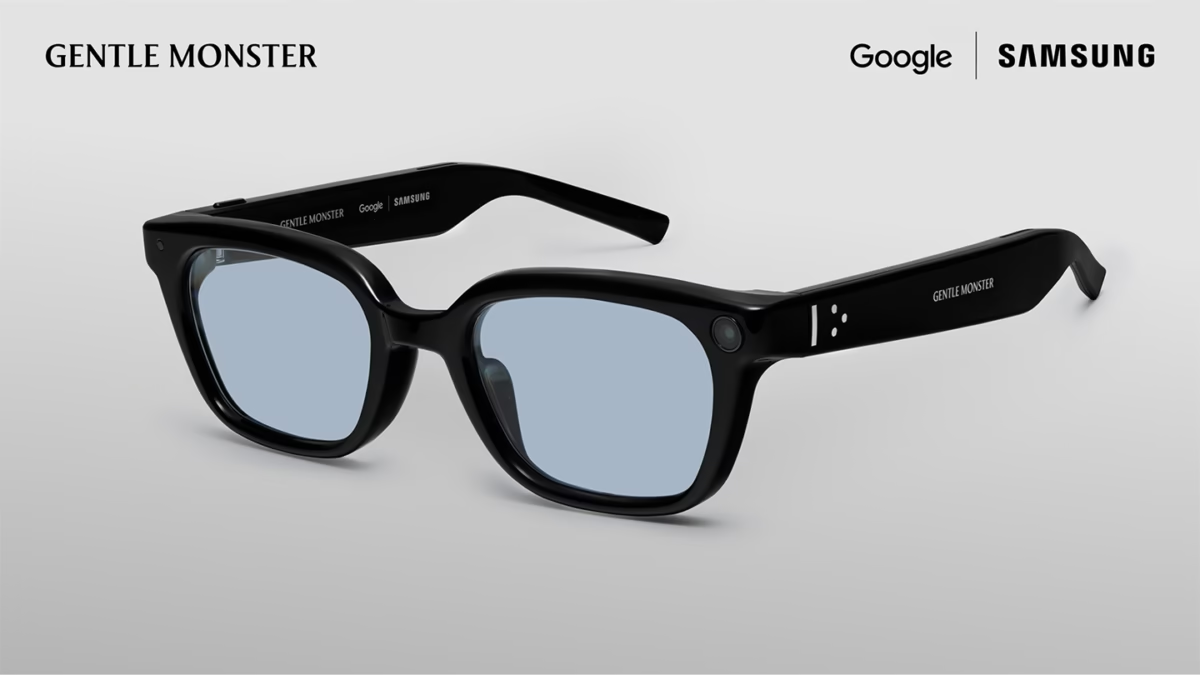
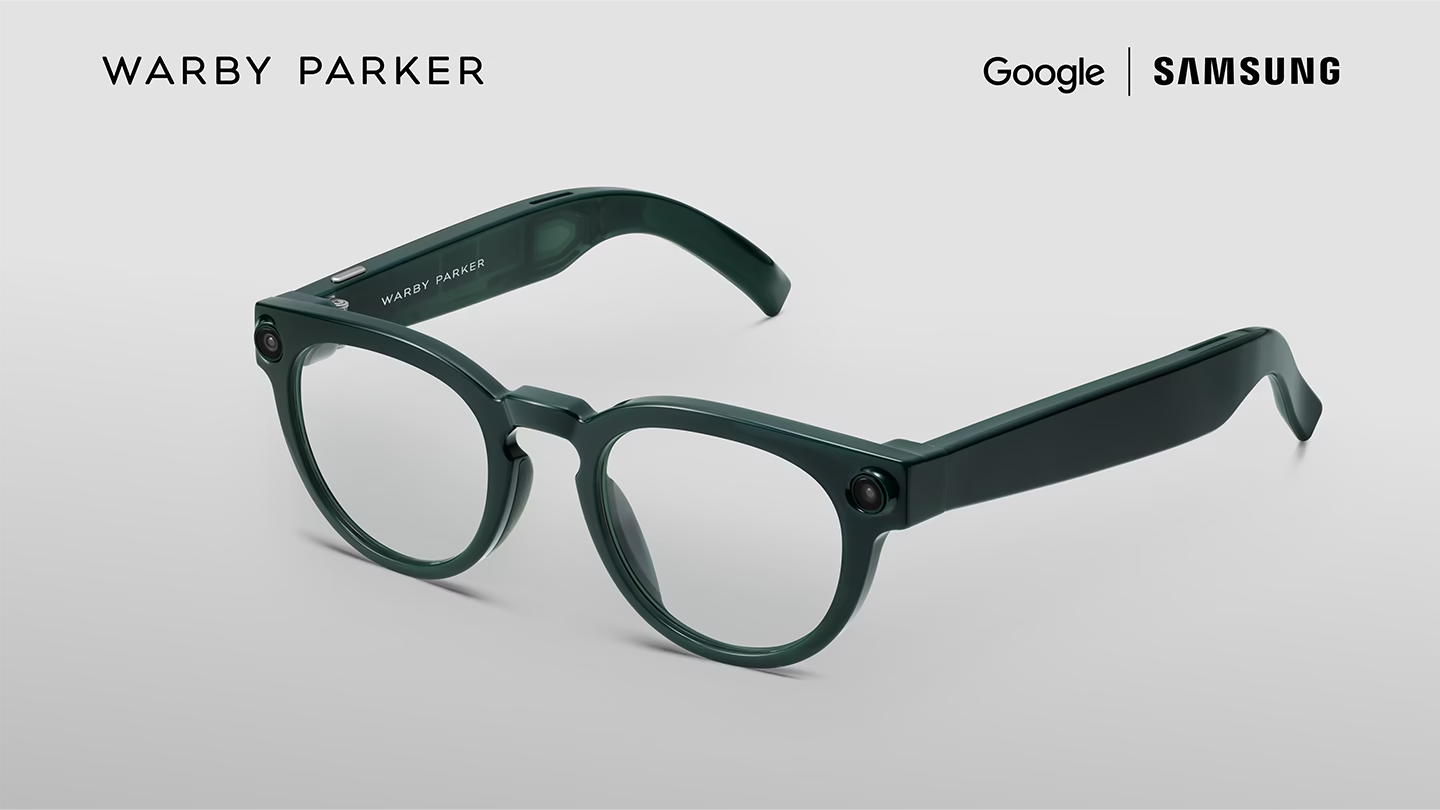
Editorial note: This is a news explainer based on official information checked on November 15, 2026. Codeweave24 has not tested the glasses. Performance claims below come from the manufacturers, and the photographs are official promotional images.
Samsung AI glasses at a glance
According to Samsung’s November 12 announcement, sales begin December 10, 2026. Both Warby Parker and Gentle Monster collections launch in the US; Gentle Monster also launches in South Korea. Preorders opened November 12.
- US starting prices: Warby Parker $395; Gentle Monster $449–$489.
- Core hardware: 12 MP camera, open-ear audio, four microphones and Snapdragon AR1 Gen 1.
- Manufacturer battery claims: up to nine hours per charge; up to 72 hours with the charged case.
- Important: full Gemini features require a compatible paired phone.
In this guide
- 1. Release date and price
- 2. What no display means
- 3. Where Gemini could help
- 4. Phone and region checks
- 5. Comfort and battery reality
- 6. Privacy controls
- 7. What to check before buying
- Frequently asked questions
1. Samsung AI glasses price: budget for the whole purchase
The starting prices above give you a reference point, not necessarily your final checkout total. Before comparing frames, request a complete quote for your chosen lenses, taxes, delivery and any optional services. A low headline price is less useful than knowing exactly what the configuration you need will cost.
Our advice is to set your maximum total before browsing designs. Ask yourself what specific problem the purchase would solve. If your answer is simply “the AI looks cool,” wait for independent testing. Curiosity is a good reason to try a demo; it is a weak reason to rush a purchase.
Work out the cost per useful day
A simple worksheet can make the Samsung AI glasses price easier to judge. Start with the final amount you would actually pay, including the lenses and delivery you need. Divide that total by the number of days you realistically expect to use the device during your chosen comparison period. This is a budgeting exercise, not a prediction of the product’s lifespan.
For example, imagine a hypothetical all-in purchase of $500. If you use it on 250 days during a year, the purchase cost works out to $2 per use-day. If you use it on only 50 days, it becomes $10 per use-day. Neither figure includes ongoing costs or a resale value. The point is to make frequency visible: a device you reach for regularly can feel very different from one left in a drawer.
Write your own numbers before deciding whether the glasses are worth it. Do not assume you will become a heavy user because you have bought them. Look at how often you currently use voice assistance, take quick photographs or need spoken information. Your existing habits are a more useful starting point than your enthusiasm on launch day.
Questions to send the retailer before paying
Here is a short message you can adapt: “I am considering this exact frame and lens configuration. Please confirm the total delivered price, compatibility with my phone and software, whether activation is supported for my account region, and the return conditions if the fit is unsuitable. Who handles support after delivery, and which costs would I pay for a return?”
Ask for the answer in a form you can keep alongside your receipt. If the retailer replies with a generic feature list, repeat the unanswered question rather than assuming it was covered. For a preorder, also ask what happens if the delivery estimate changes and when payment is taken. These are questions to verify with the seller, not statements about any particular retailer’s policies.
Finally, make one clear decision rule for Samsung AI glasses: what evidence would persuade you to buy, and what would make you wait? You might require a comfortable in-person fitting, a successful demonstration with your phone, or an independent review that tests your main use case. Setting that rule now helps keep a limited-time promotion from making the decision for you.
2. Samsung AI glasses have no screen in the lenses
Samsung’s official product FAQ says there is no display: interaction uses sound and voice. Prescription lens options are supported, and the two partner collections share hardware and software specifications.
The practical implication is straightforward: do not buy expecting a miniature monitor in front of your eyes. Think about whether you prefer hearing an answer. Someone who likes visual lists, maps and silent reading may have very different needs from someone who wants quick spoken assistance.
Try imagining a normal morning. Would listening to information help while your hands are occupied? Would it feel awkward on public transport? Those questions tell you more about personal usefulness than a dramatic promotional video.
3. Gemini is the reason this is more than a camera accessory
The product page describes visual questions, spoken translations, voice-guided navigation, calls and message summaries. It also lists music playback. These are advertised capabilities, not results from our testing.
For an illustrative use case, imagine looking at a menu and asking for help understanding it. The useful part would be reducing the steps between noticing something and asking a question. Whether that feels effortless in a noisy restaurant is exactly the kind of detail a real-world review needs to establish.
We would judge Samsung AI glasses on three things: how often they understand the request correctly, how quickly the answer arrives, and whether the response is useful enough to avoid checking a phone anyway. A long feature list cannot settle those questions.
You can also explore everyday AI assistance before buying hardware. Our guide to five everyday tasks you can do with Claude includes practical prompts for emails, planning and electronics comparisons. It offers a way to identify which kinds of assistance you actually use.
4. Check your phone and country before importing
Samsung lists supported Galaxy, Pixel and iPhone configurations, with specific software and memory requirements. Its compatibility and activation FAQ also says activation requires accounts associated with an official sales market; some functions may be limited abroad.
Do not interpret “works with iPhone” or “works with Android” as a promise for every phone in that family. Match your exact handset, software version and account region against the current requirements. Ask the retailer to confirm anything unclear in writing.
For readers outside the launch markets, including Somaliland, importing adds another decision: how would you handle an activation problem, a poor fit or a return? Check that before paying a reseller. A parcel arriving successfully is not the same as having a supported setup.
5. Comfort and battery claims need a real-life test
Samsung’s product FAQ describes roughly 41 g average weight and IPX4 splash resistance. It qualifies battery life as mixed-use and says actual endurance depends on usage, settings and network conditions.
Our advice: treat battery figures as a starting point for questions. Ask what happens during the activities you expect to use most. A day of occasional notifications is different from a day spent repeatedly asking questions, taking pictures and listening to audio.
Comfort deserves equal attention. Spend time checking pressure around your ears and nose, stability when looking down, and the fit with your chosen lenses. A device worn on your face has to earn its place every hour, not just look good on a specification sheet.
When independent reviews arrive, look for a description of the test routine rather than only a final battery number. The best comparison is the one closest to your own day.
6. Samsung AI glasses privacy: separate visuals from chat history
In its privacy explanation, Google says camera visuals sent to Gemini are not saved in Gemini History or used for AI training or ad targeting. It separately says chat text can be saved, with history and model-improvement controls available to users.
Google also describes an external recording indicator, capture restrictions when the indicator is covered, face redaction before Gemini processing, app permissions and a physical power switch. These are stated safeguards, not an independent security assessment.
The distinction between visuals and chat history matters. Read the settings for the actual account and apps you use instead of assuming one privacy statement covers everything.
Our practical rule is simple: explain what the glasses are doing when people around you could reasonably be unsure. Check the expectations of the place you are visiting, especially in meetings and private spaces. Good manners remain useful even when the hardware gets smarter.
7. Should you buy Samsung AI glasses at launch?
Our editorial view: put them on your shortlist if you can identify repeated moments where spoken, hands-free help would be valuable. Wait if you mainly want the novelty or if compatibility, regional support or fit is uncertain.
We would not declare Samsung AI glasses a must-buy from launch materials alone. The deciding evidence should include independent tests of speech recognition in noise, answer accuracy, audio leakage, battery endurance and everyday comfort.
A five-minute buying checklist
- Write down three tasks you would use the glasses for every week.
- Verify your exact phone, software and account-region requirements.
- Get a complete price for the frame and lenses you want.
- Confirm the return window and support arrangements for your location.
- Try the fit and listen to the speakers before committing, where a demo is available.
If you cannot complete the checklist yet, there is no need to rush. Waiting can replace assumptions with useful evidence. Early availability is exciting, but it does not make the product equally suitable for everyone.
Three everyday scenarios: where would you actually use them?
These are hypothetical buying scenarios, not reports of tested performance. Use them to decide what a demonstration needs to prove for you. The strongest reason to buy Samsung AI glasses would be a task you already repeat, where using your phone is inconvenient and a spoken answer would genuinely help.
The traveler: useful answers, without losing the moment
Imagine arriving in an unfamiliar neighborhood with a bag in each hand. You want a short answer about your surroundings, then a clear next step. In a demonstration, try a question about something you can verify yourself. Follow it with a second question that depends on the first answer. Notice whether the conversation stays useful or becomes a sequence of corrections.
For Samsung AI glasses, our proposed travel test would focus on clarity and interruption. Can you understand a response at a comfortable volume? Can you stop it quickly? Does a long answer leave you more confused than a quick look at your phone? If the demo cannot answer those questions, leave them open instead of assuming the experience will match a launch video.
The busy communicator: shorter interactions, not more notifications
Imagine someone who regularly needs to catch a message while carrying groceries or moving between rooms. The goal is to reduce unnecessary phone handling, not to hear every notification all day. Before buying, list the people and types of message you actually need to notice. Ask the demonstrator to show how notifications are selected and how you can quiet the device.
When evaluating Samsung AI glasses, try an ordinary, low-stakes message with a name, time and short instruction. Check whether the spoken summary keeps those details and whether you can review a reply before sending. This is a proposed test, not a claim that every app supports the same controls. Exact app behavior should be confirmed on your own phone.
The photography fan: convenience versus control
Someone who enjoys recording moments may value having a camera ready without holding a phone. But convenience is only half the question. Ask to see original sample files on a normal screen, rather than judging pictures from a promotional montage. Look at framing, motion and indoor lighting. Decide whether the results meet your needs for sharing, keeping memories or creating content.
Our buying test for Samsung AI glasses would also include the steps after capture. Ask how you find a recent image, transfer it and delete one you do not want. Count the effort involved in finishing the task. A camera that starts quickly may still disappoint if organizing its output feels cumbersome. Check this workflow before deciding it will replace any part of your current setup.
A simple scorecard for your store demo
Give each of your three most important tasks a rating: easy, acceptable or frustrating. Add one sentence explaining why. For example: “The answer was useful, but I had to repeat the place name,” or “The frame felt comfortable, but I could not hear clearly at my preferred volume.” These are example notes, not observations about the product.
Keep a separate column for anything the shop could not demonstrate. Unknown is a valid result. Do not turn a promise about a future update into a feature you are paying for today. If a missing function is essential to your purchase, wait until the function is available and somebody can show it working.
Use the same questions if you compare Samsung AI glasses with another wearable. Consistent tasks make the comparison fairer than comparing two brands’ best promotional clips. You do not need a laboratory: a familiar task, a clear expectation and honest notes will tell you a lot about whether the product fits your day.
Frequently asked questions
When are Samsung AI glasses being released?
Samsung’s announced date is December 10, 2026, in the launch markets described above. Check the official release notice and your retailer for the availability of a particular frame.
Do Samsung AI glasses replace a smartphone?
No. The full AI experience depends on a compatible paired phone. Consider them an accessory to your existing setup.
Can I see maps or text inside the lenses?
No. Samsung says this intelligent eyewear has no display. Do not confuse spoken navigation with a map projected into your view.
Have you reviewed them hands-on?
No. This article explains official launch information and adds our buying considerations. It does not claim tested performance, measured battery life or personal experience wearing the product.
The question worth asking
Samsung AI glasses are interesting because the promise is small and familiar: get help without interrupting what you are doing. The test will be whether that convenience lasts after the first few days of excitement.
For now, check the fit, support and real-world evidence before opening your wallet. Browse our electronics coverage for more device news and practical buying guides. Would audio-only AI glasses be useful in your daily routine, or would you rather keep using your phone?
Sources and image credits
- Samsung Mobile Press: November 12 launch announcement — release timing, prices, hardware and activation requirements. Official photographs credited to Samsung Mobile Press.
- Samsung US: Intelligent Eyewear — product FAQs, supported experiences and limitations.
- Google: Designing for privacy on intelligent eyewear — data handling and privacy controls.