
Complete HTML beginner guide. Learn HTML full form, history, how to download tools, write code & build your first website. Step-by-step tutorial with examples.
HTML Introduction: What Does HTML Really Mean?
When you are starting out in web development you have probably heard of HTML. HTML is the core language used on the web, but just what is it? HTML stands for HyperText Markup Language – let’s dissect it:
- HyperText: Hypertext refers to text that is linked to another document.
- Markup: Mark up simply means the process of adding annotations to content so that the structural parts can be defined.
- Language: Language is simply a method of communication using specific rules.
For example, HTML is the framework or the “skeleton” of each webpage you visit. Although HTML does not provide the visual styling (CSS) or interactive behavior (JavaScript), it allows us to add the fundamental building blocks which enable web content.
A Brief Background of How HTML Developed
Knowing the origins of how HTML developed will help you understand why HTML has become such an important part of our modern digital world. In 1991, Tim Berners-Lee, who worked at CERN, developed HTML to make it easier for researchers to share documents.
Important Dates and Releases for HTML Development:
- 1991: First proposal of HTML
- 1995: Standardized HTML 2.0
- 1997: More sophisticated features were added in HTML 4.0
- 2014: HTML5 became the current standard we use now today
The movement to HTML5 had a big impact when it was implemented due to the introduction of semantic elements, native video/audio support, and improved form controls – all of which made websites stronger and more accessible.
Setting Up Your HTML Development Environment
There is one big misconception that most new developers have about HTML. The confusion is with downloading HTML. Don’t get this twisted; you do not download the HTML – it is a standardized way that web browsers interpret your code. What you will need to develop HTML is:
The Basic Tools Required to Develop HTML
1. A Good Quality Text Editor
- Visual Studio Code (free and my number one choice for all beginner development needs).
- Sublime Text.
- Atom.
2. A Modern Web Browser
- Google Chrome (includes developer tools) as your primary browser.
- Mozilla Firefox.
- Microsoft Edge.
3. Optional Development Tools for Beginners
- The Live Server extension in Visual Studio Code
Creating Your First HTML Program
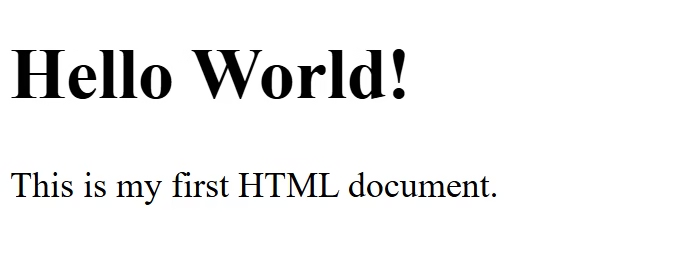
Let’s start with the classic “Hello World” example, but with proper explanation:
<!DOCTYPE html>
<html lang="en">
<head>
    <meta charset="UTF-8">
    <meta name="viewport" content="width=device-width, initial-scale=1.0">
    <title>My First HTML Page</title>
</head>
<body>
    <h1>Hello World!</h1>
    <p>This is my first HTML document.</p>
</body>
</html>
Output
Breaking Down the Structure:
<!DOCTYPE html>: Declares this as an HTML5 document<html>: The root element wrapping all content<head>: Contains meta-information about the page<body>: Holds the visible content users see
Essential HTML Elements Every Beginner Should Master
1. Text Formatting Elements
There are many different ways that you can use HTML to make your text look good and be organized in a way that makes sense to both people using your website and to search engines.
<h1>Main Heading</h1>
<h2>Subheading</h2>
<p>This is a paragraph of text.</p>
<strong>Important text</strong>
<em>Emphasized text</em>
2. Links and Navigation
The link is what holds together all the content of the World Wide Web. Links enable users to move from page-to-page, from section-to-section, or from one resource to another.
<a href="https://www.example.com" target="_blank">Visit Example</a>
<a href="#section2">Jump to Section 2</a>
3. Images
Images are an important part of making a website interesting to look at as well as having a visually appealing presentation. The picture is inserted with the HTML tag.
<img src="image.jpg" alt="Descriptive text about the image" width="500" height="300">4. Lists
Html has three types of lists which you can use to organize the content of your website in a structural way. Html lists will help you put information into logical groupings, so it will be easier for people to find the information they are looking for and for search engines to index the information on your website.
<ul>
  <li>Unordered list item</li>
  <li>Another item</li>
</ul>

<ol>
  <li>First ordered item</li>
  <li>Second ordered item</li>
</ol>
Building a Complete Website: A Practical Example
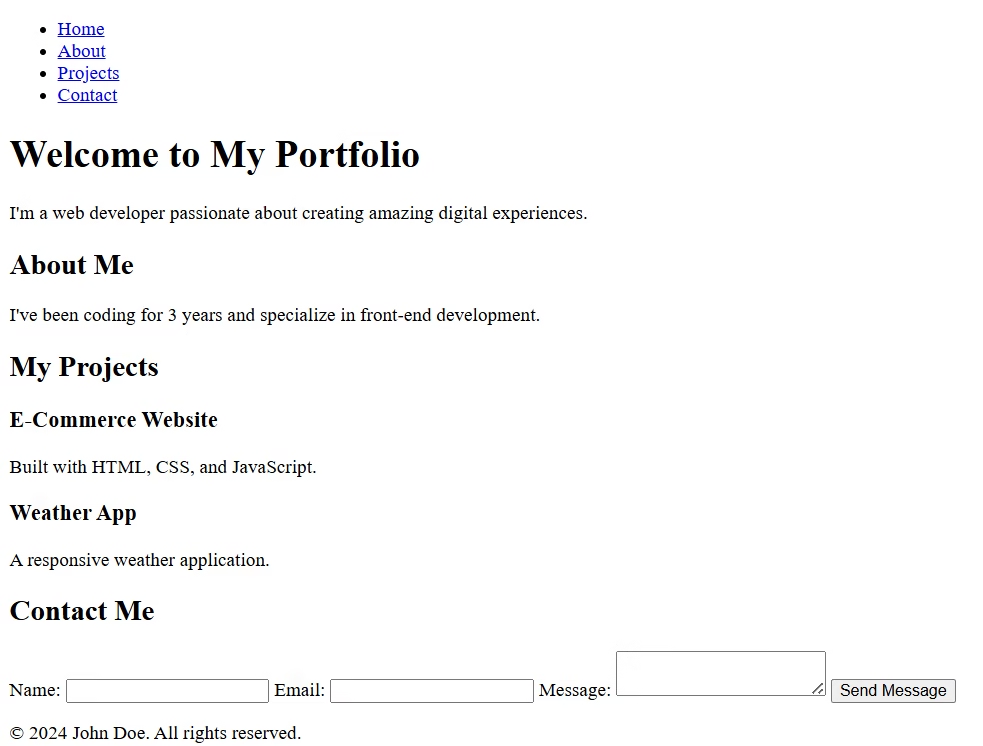
Let’s create a simple personal portfolio website to demonstrate real-world HTML usage:
<!DOCTYPE html>
<html lang="en">
<head>
<meta charset="UTF-8">
<meta name="viewport" content="width=device-width, initial-scale=1.0">
<title>John Doe - Portfolio</title>
</head>
<body>
<header>
<nav>
<ul>
<li><a href="#home">Home</a></li>
<li><a href="#about">About</a></li>
<li><a href="#projects">Projects</a></li>
<li><a href="#contact">Contact</a></li>
</ul>
</nav>
</header>
<main>
<section id="home">
<h1>Welcome to My Portfolio</h1>
<p>I'm a web developer passionate about creating amazing digital experiences.</p>
</section>
<section id="about">
<h2>About Me</h2>
<p>I've been coding for 3 years and specialize in front-end development.</p>
</section>
<section id="projects">
<h2>My Projects</h2>
<article>
<h3>E-Commerce Website</h3>
<p>Built with HTML, CSS, and JavaScript.</p>
</article>
<article>
<h3>Weather App</h3>
<p>A responsive weather application.</p>
</article>
</section>
<section id="contact">
<h2>Contact Me</h2>
<form>
<label for="name">Name:</label>
<input type="text" id="name" name="name" required>
<label for="email">Email:</label>
<input type="email" id="email" name="email" required>
<label for="message">Message:</label>
<textarea id="message" name="message" required></textarea>
<button type="submit">Send Message</button>
</form>
</section>
</main>
<footer>
<p>© 2024 John Doe. All rights reserved.</p>
</footer>
</body>
</html>output
Best Practices for Writing Quality HTML
1. Use Semantic Elements
Instead of generic <div> tags, use:
<header>,<footer>,<nav>,<main><article>,<section>,<aside>- These improve accessibility and SEO
2. Always Include Alt Text for Images
<!-- Good -->
<img src="logo.png" alt="Company logo">

<!-- Bad -->
<img src="logo.png">
3. Maintain Proper Document Structure
Always include the essential meta tags in your <head> section:
<meta charset="UTF-8">
<meta name="viewport" content="width=device-width, initial-scale=1.0">
<title>Descriptive Page Title</title>
4. Validate Your Code
Use the W3C Markup Validation Service to ensure your HTML follows standards.
Learning Resources and Next Steps
While there are many excellent learning platforms available (including HTML Javatpoint, W3Schools, MDN Web Docs), the key to mastering HTML is consistent practice.
Recommended Learning Path:
- Master basic HTML elements (2-3 weeks)
- Learn CSS for styling (3-4 weeks)
- Add interactivity with JavaScript (1-2 months)
- Explore responsive design (2-3 weeks)
- Build real projects (ongoing)
Conclusion: Your Journey Begins Here
HTML is more than just a markup language; it’s an entry into the world of web development. As you understand the history of HTML, learn the basic syntax of HTML and follow some of the best practices in using HTML, you will have built a good starting point for your future in development.
At one time or another we all were beginners, so remember to start small and work your way up from there (the easiest thing to do is start by working on small projects). Don’t be afraid to try new things and explore different ways of doing things. There is a large amount of support from the web development community for those who want to learn and become part of it, and many resources available to help you grow.
Ready to continue down this path? Keep practicing, build what you love, and before long you’ll be making websites that can help others on the web.